Need Help? sales@householdparts.com

The DC97-14486A dryer heating element is a 240V 5400W electric heating duct assembly designed for Samsung dryers and compatible with several other brands. When a Samsung dryer tumbles but produces no heat — or takes multiple cycles to dry a single load — a failed heating element is the most common cause.
The DC97-14486A is a complete “drop-in” unit that includes the heating element coil pre-installed inside a galvanized steel housing. Unlike bare replacement elements, this assembly comes with the DC47-00018A high-limit thermostat and DC96-00887A thermal fuse already attached, significantly simplifying the repair process.
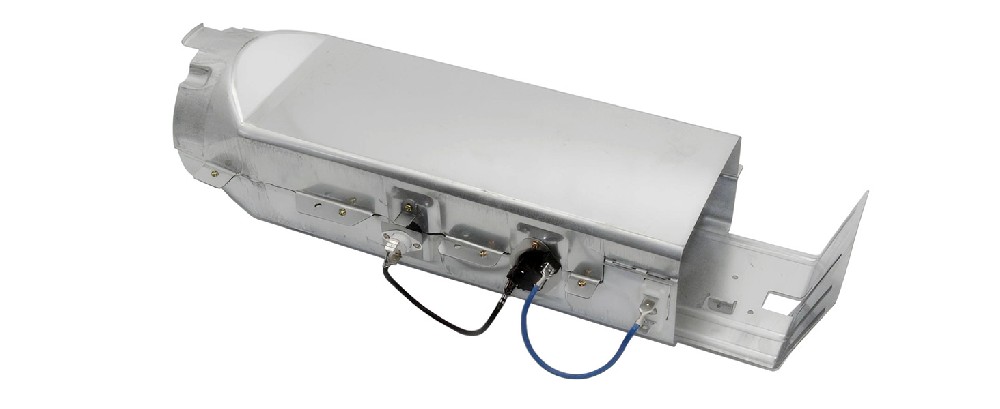
Voltage: 240V AC
Wattage: 5300W–5400W
Coil material: Nickel-chromium (≥35%)
Terminal type: 1/4″ male quick connect spade
Assembly dimensions: Approximately 20″ × 5″
Included components Housing, heating coil, insulators, DC47-00018A thermostat, DC96-00887A thermal fuse
Interchangeable part numbers: DC97-14486D, DC97-08891A, AP4342351, DE486A, 1795935, W10222771, DC9714486A.
The DC97-14486A fits electric dryers only from Samsung, Kenmore, Amana, Maytag, KitchenAid, and Roper.
Compatible Samsung models include:
DV42H5000EW/A3, DV42H5200EW/A3, DV42H5200EP/A3
DV45H7000EW/A2, DV48H7400EW/A2
DV40J3000EW/A2, DVE50R5200W/A3, DVE50R5400V/A3
DV203AES, DV203AEW, DV218AEB, DV210AEW/XAA, DV330AEB/XAA
DV407AEW, DV448AEP, DV337AEL, DV331AER, DV209AEW⚠️ Important: The DC97-14486A is for electric dryers only. Gas dryers use a different heating mechanism and are not compatible with this part.
No heat Drum spins but air stays cold: element burned out or open circuit
Takes too long to dry: Requires 2+ cycles to dry a load; reduced heat output from partial failure
Overheating Burning smell during operation: damaged or shorted coil
Dryer shuts off early Cycle stops before clothes are dry: thermal cut-off activated
Replacing the DC97-14486A is a straightforward DIY repair that takes approximately 30–60 minutes for most users.
Tools needed: ¼″ nut driver or Phillips screwdriver, needle-nose pliers, multimeter, camera (for wiring documentation).
Installation steps:
1 Disconnect power. Unplug dryer or turn off circuit breaker.
2 Remove rear panel. Pull dryer away from wall and remove panel screws.
3 Take reference photos. Document all wire connections before disconnecting.
4 Disconnect wires. Remove wires from terminals using needle-nose pliers.
5 Remove old assembly. Unfasten screws securing the duct assembly.
6 Install new DC97-14486A. Align with mounting holes and secure screws.
7 Reconnect wires. Follow reference photos to ensure correct connections.
8 Replace panel and test. Run a timed dry cycle on high heat — warm air should appear within 2 minutes.
Q: Is the DC97-14486A the same as the DC97-14486D?
A: Yes — the DC97-14486D has been discontinued and replaced by the DC97-14486A. The A revision is the current OEM version and is fully backward compatible.
Q: Can I install this myself?
A: Yes. The job takes 30–60 minutes with basic hand tools. The pre-assembled duct design eliminates much of the wiring complexity found with bare heating elements.
Q: Why does my dryer still have no heat after replacing the DC97-14486A?
A: Test the thermal fuse (DC96-00887A) and thermistor (DC32-00007A). If either has failed, the dryer won‘t heat even with a new element. A complete kit includes all three.
Q: How long does the DC97-14486A last?
A: With proper lint maintenance and adequate airflow, 3–5 years on average. Regular cleaning of the lint trap and exhaust vent dramatically extends service life.
Q: Is aftermarket quality as good as OEM?
A: Quality varies by manufacturer. Premium aftermarket options use ≥85% nickel‑chromium coils and offer 1–2 year warranties. Look for clear electrical specifications and reliable terminal connections. OEM parts are also available but typically cost 30–50% more.


 0
0